> For the complete documentation index, see [llms.txt](https://docs.autopilotbrand.com/llms.txt). Markdown versions of documentation pages are available by appending `.md` to page URLs; this page is available as [Markdown](https://docs.autopilotbrand.com/portal-pages/listing-issues.md).
# Listing Issues
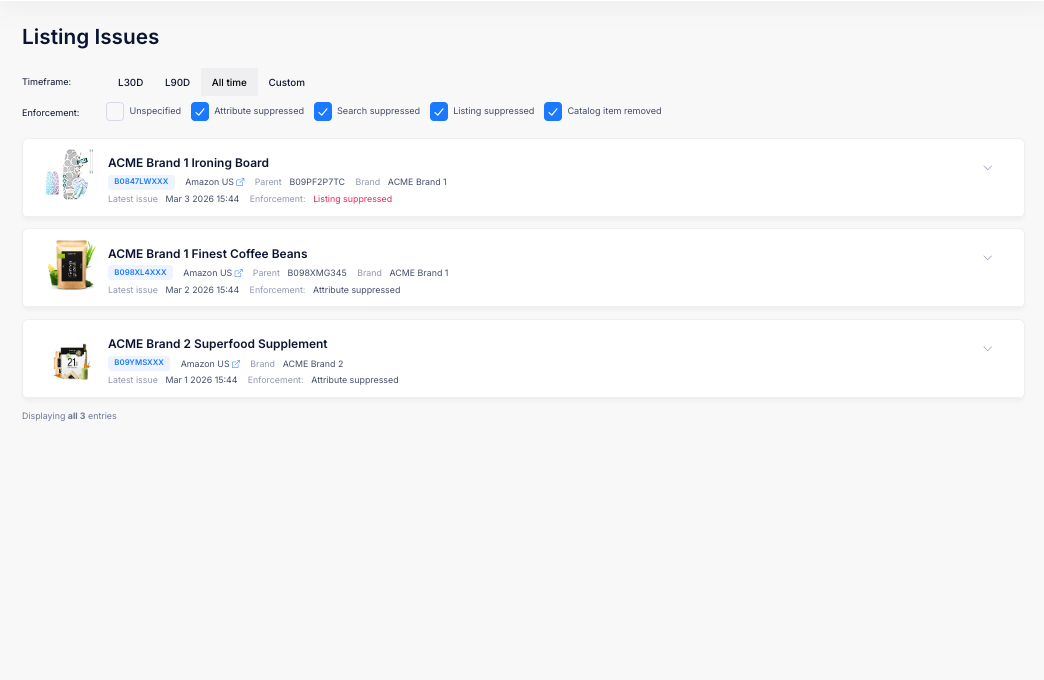
The Listing Issues page gives you an organization-wide view of all active listing issues detected by Amazon across your enrolled ASINs. Use this page to monitor for policy violations, suppression warnings, and other issues that may affect your listings.
## Filters
### Timeframe
Control the date range for detected issues:
* **L30D** (default)
* **L90D**
* **All time**
* **Custom** date range
### Brand
Filter by brand using the dropdown. Only brands with enrolled ASINs in your organization are shown. Select **All Brands** to clear the filter.
### Marketplace
Filter by Amazon marketplace using the dropdown. All marketplaces are shown. Select **All Marketplaces** to clear the filter. This filter can be combined with the Timeframe, Brand, and Impact filters.
### Impact
Filter by impact using the checkbox bar. Select one or more impact levels to focus on the issues that matter most:
* **Unspecified** – No specific impact indicated
* **Attribute suppressed** – A specific attribute has been suppressed by Amazon
* **Search suppressed** – The listing has been suppressed from search results
* **Listing suppressed** – The entire listing has been suppressed and is no longer visible to shoppers
* **Catalog item removed** – The product has been removed from the Amazon catalog, or will be removed at a future date (in which case an Exemption Expiration Date will show)
* **Variation disconnected** – A child ASIN has been dropped from its parent variation family and is now standalone. See [Child ASIN Disconnected from Parent](/portal-pages/listing-issues/child-asin-disconnected-from-parent.md)
## Issue Tiles
Each ASIN with active issues is displayed as an expandable tile:
* **Product Image** and **Title**
* **ASIN Badge** with Parent/Child type
* **Marketplace Link** to the live Amazon listing
* **Parent ASIN** (for Child ASINs) – click to navigate to the parent's Product Page
* **Brand**
* **Latest Issue** – When the most recent issue was detected
* **Impact** – The impact of the issue, highlighted in red for severe actions (e.g., "Listing suppressed") or in default styling if unspecified
The total number of matching entries is displayed below the list (e.g., "Displaying all 3 entries").
## Issue Details
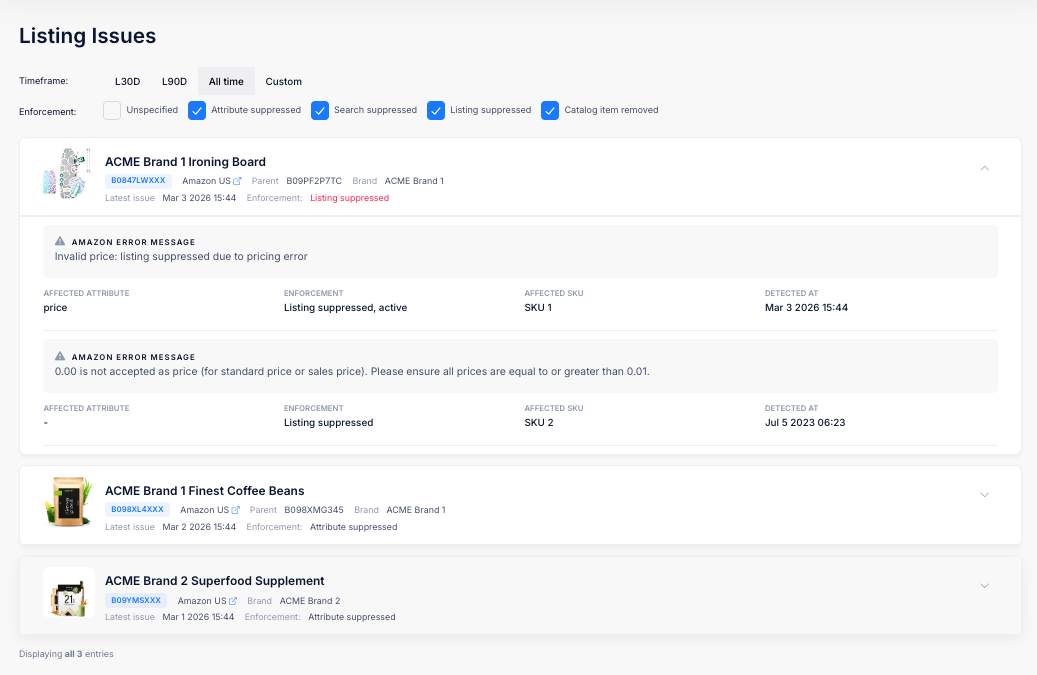
Click on a tile to expand it and see the individual issues for that ASIN.
Each issue displays:
| Field | Description |
| ------------------------ | --------------------------------------------------------------------------------------------------------------------------- |
| **Amazon Error Message** | Amazon's description of the issue, shown in a highlighted message box. Severe issues are highlighted with a red background. |
| **Affected Attribute** | The listing field the issue relates to (e.g., price, images, title). |
| **Impact** | The impact of the issue and its current status (e.g., "Listing suppressed, active"). |
| **Affected SKU** | The specific SKU with the issue. |
| **Detected At** | The date and time the issue was first detected. |
{% hint style="warning" %}
Issues with enforcement actions such as **Listing suppressed** require immediate attention, as they mean the listing is no longer visible to shoppers on Amazon.
{% endhint %}